Blob, Object & File Storage
Learn the difference between block, file, and object storage, how Amazon S3 achieves 11-nines durability, distributed file systems (HDFS, GFS), content-addressable storage, and how to design large file storage for images, videos, and documents.
Learn the difference between block, file, and object storage, how Amazon S3 achieves 11-nines durability, distributed file systems (HDFS, GFS), content-addressable storage, and how to design large file storage for images, videos, and documents. This hands-on tutorial focuses on practical implementation of blob, object & file storage concepts.
Blob, Object & File Storage
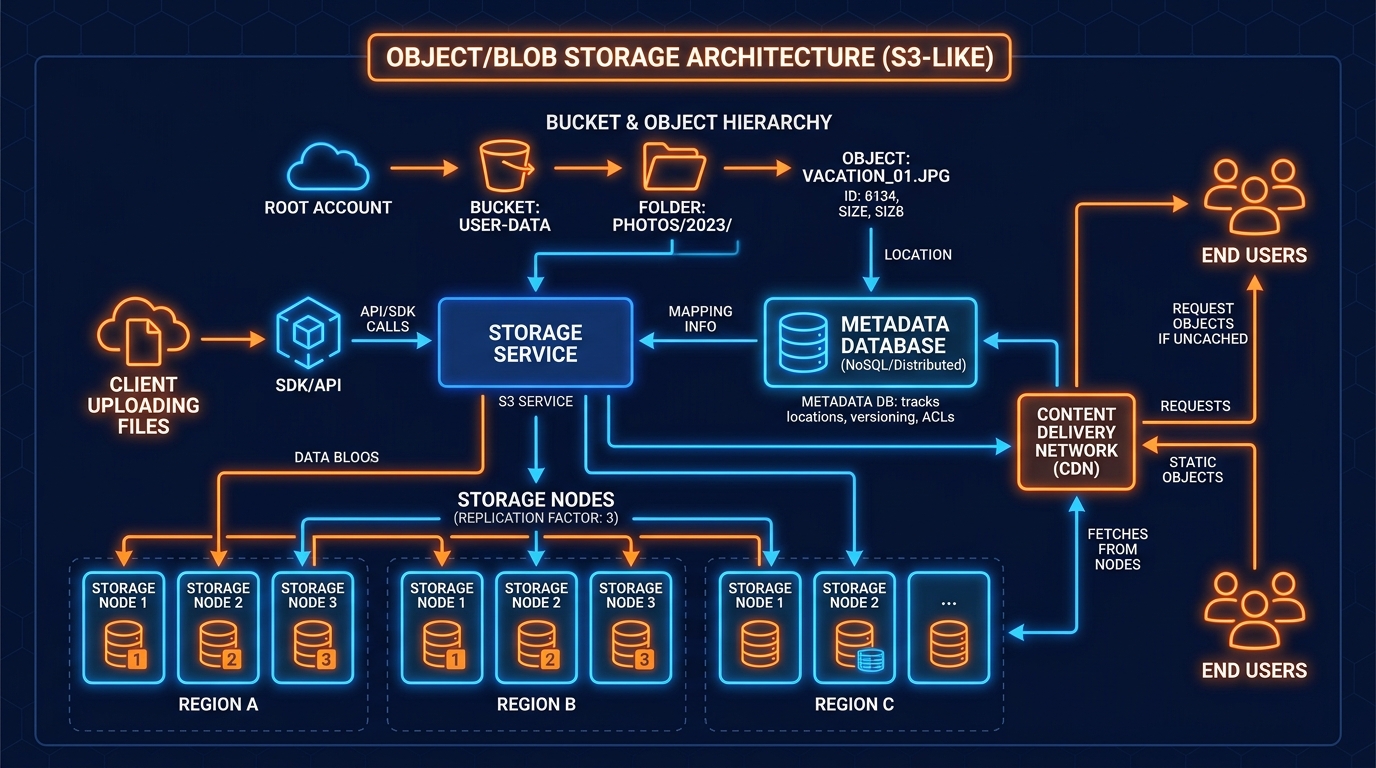
Not all data fits neatly in a database table. Images, videos, PDFs, backups, and ML model weights are binary large objects (blobs) that require specialized storage systems designed for massive scale, durability, and cheap sequential reads.
[!IMPORTANT] Store structured data (users, orders, messages) in a database. Store binary/large files (images, videos, documents) in object storage (S3, GCS). Never put blobs in a SQL database — it destroys performance.
Three Storage Types
| Block Storage | File Storage | Object Storage | |
|---|---|---|---|
| Access | Raw I/O (OS block device) | POSIX filesystem (NFS) | HTTP REST API |
| Structure | Unstructured blocks | Hierarchical directories | Flat bucket + key |
| Use case | Database disk, VM disk | Shared filesystem, ML data | Images, videos, backups |
| Performance | Highest (local SSD speeds) | Medium | Lower (network-bound) |
| Cost | Most expensive | Medium | Cheapest per GB |
| Scale | Limited (single server) | Medium | Virtually unlimited |
| Durability | Depends on RAID | Depends on NAS | 99.999999999% (S3) |
Amazon S3 Architecture (11 Nines Durability)
S3 achieves 99.999999999% (11 nines) durability — losing 1 object out of 100 billion every 10,000 years:
Distributed File Systems: HDFS & GFS
For big data and analytics workloads, distributed file systems distribute large files across commodity hardware:
Quiz
Quiz
Question 1 of 2A user uploads a 2GB video file to your platform. What is the correct architecture to handle this upload?
Key Takeaways
✅ Use object storage (S3/GCS) for all binary files — never store blobs in a SQL database.
✅ Pre-signed URLs let clients upload directly to S3, keeping file bytes off your API servers.
✅ S3 achieves 11-nines durability through erasure coding across 3+ availability zones.
✅ Content-addressable storage (SHA-256 as key) gives automatic deduplication and cache-ability.
✅ Use multipart upload for files >100MB — enables parallel upload, resumability, and avoids timeouts.
Official Resources
- 📖 Amazon S3 Documentation — S3 features, multipart upload, pre-signed URLs
- 📖 Google Cloud Storage — GCS reference
- 📖 Cloudflare R2 — Zero egress cost S3-compatible storage
- 📖 HDFS Architecture — Google GFS paper-inspired design
What's Next?
You now know how to store all types of data at scale. The next critical challenge: what happens when any of those systems fail?
Next: Fault Tolerance & Redundancy — How to design systems that survive failures without users ever noticing.